Design
Ask Less,
Recall More,
Better Results
Project
Type
Solo Case Study
Scope
UI/UX Redesign
Timeline
10 Weeks
Version
ChatGPT 4o
Tool
Figma
My Role
#
User interview
#
User survey
#
Desk research
#
Usability test
Overview
Redesigning ChatGPT for effortless prompting & repeat-free conversations
Problems:

Because there are no guides for writing better prompts, users must send multiple messages just to get one proper answer.
ChatGPT often forgets previous context or information, forcing users to repeat the same instructions over and over.
Design Solution I made:
Auto Prompt Optimizer: AI automatically refines messy thoughts into clear, high-quality prompts.
Initial Instruction Setup: Guides users to set preferences at the start so ChatGPT follows a consistent guideline.
Selective Memory: Allows users to manually select and save specific parts of the conversation for the AI to remember permanently.

Design
Solution 01
One-click AI optimizer to streamline prompts
Users can optimize their prompts with a single click before sending. This reduces the pressure of writing perfect prompts and the fatigue caused by multiple follow-up questions.

As-is
When users ask a broad or vague question, the AI gives a general answer. Users must ask several follow-up questions to finally get the result they want.


Upgrade question in one click
AI improves your draft so the prompt gets more precise for better answers.
To-be
Users can type their thoughts freely and click the optimizer to transform them into a structured prompt. This helps users clarify their ideas and allows for final manual edits before sending.
Design
Solution 02
Simplified instruction settings via onboarding to keep the AI following the same rules
Users are guided to set chat instructions from the start. This ensures the AI follows the user's rules throughout the conversation without needing constant reminders.


As-is
Users can only set instructions after creating a “Project,” so many new users don’t realize it. Also, When starting a new chat, they often forget this step. The free-form writing input feels overwhelming.
To-be
An onboarding flow encourages users to set instructions before starting, with an option to skip if not needed. Users can easily choose from popular categories or enter custom text for higher flexibility.
Design
Solution 03
Selective memory to keep the conversation on track
Users can highlight and save specific information from AI responses that they want the AI to remember. This ensures a smooth flow and prevents the need to repeat details even if the topic changes.
As-is
ChatGPT’s memory is inconsistent; it remembers unnecessary parts while forgetting critical requirements or context.

One-Tap Memory Save
Highlight any text and instantly store it in memory without leaving the chat.
To-be
By manually selecting what to remember, users maintain context and continue personalized conversations without redundant explanations.
Discover
Seed Issue
Smart, but Constant Re-asking to Get the Right Answer and a Messy Chat History
In my experience with ChatGPT, I often had to rephrase and ask repeatedly to get the right response. If I had known how to write the 'right' prompt from the start, I could have reached the answer much faster. Yet, whenever I faced a blank chat box, I still felt unsure of where to even begin.
Another problem was that the conversation kept just kind of jumping from one thing to another, so the chat history piled up without structure, mixing unrelated topics and making it hard to revisit past discussions.
Actions to validate the issue

Desk Resrerach
User Review Analysis
Competitor Analysis
User Interview
Research / Discover
Desk Research
Users keep rephrasing and re-asking because ChatGPT misses their intent

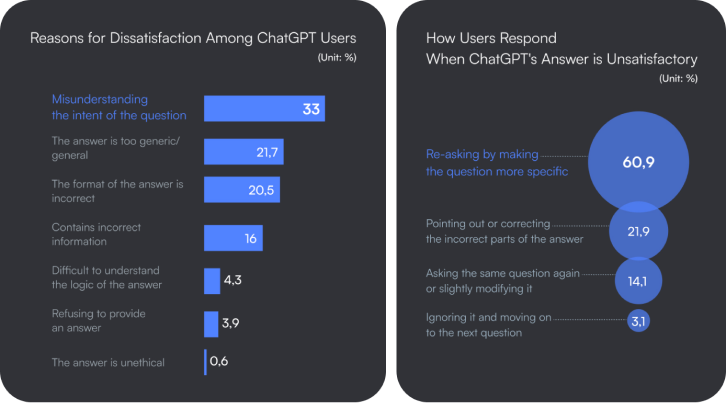
Kim, Yoonsu, et al. "Understanding Users' Dissatisfaction with ChatGPT Responses: Types, Resolving Tactics, and the Effect of Knowledge Level." Proceedings of the 29th International Conference on Intelligent User Interfaces, Association for Computing Machinery, 2024, pp. 385–404. ACM Digital Library
Better prompts, better answers: How you ask questions decides the quality of AI answers
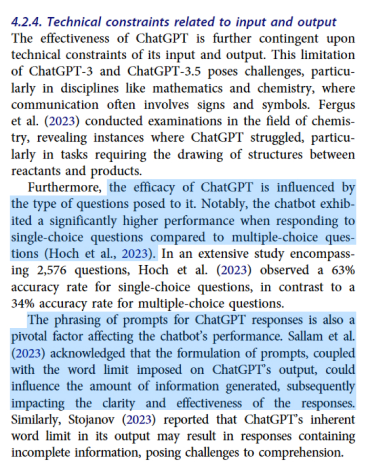
Hossain, M. M., Jahan, N., Ahsan, M., Islam, M. A., & Shohel, M. M. C. (2023). A Systematic Review of the Limitations and Associated Opportunities of ChatGPT. Journal of Information Systems Education, 34(3), 307-323.

Kim, Yoonsu, et al. "Understanding Users' Dissatisfaction with ChatGPT Responses: Types, Resolving Tactics, and the Effect of Knowledge Level." Proceedings of the 29th International Conference on Intelligent User Interfaces, 2024, pp. 261-76.
Providing intuitive prompt guides and auto-prompting can improve AI answers
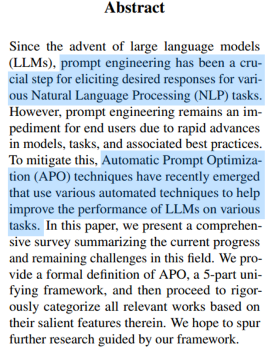
Hossain, M. M., Jahan, N., Ahsan, M., Islam, M. A., & Shohel, M. M. C. (2023). A Systematic Review of the Limitations and Associated Opportunities of ChatGPT. Journal of Information Systems Education, 34(3), 307-323.

Kim, Yoonsu, et al. "Understanding Users' Dissatisfaction with ChatGPT Responses: Types, Resolving Tactics, and the Effect of Knowledge Level." Proceedings of the 29th International Conference on Intelligent User Interfaces, 2024, pp. 261-76.
Low Reliability Due to Incorrect Answers Is the Biggest Limitation of ChatGPT
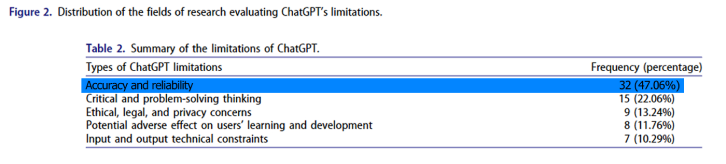
Hossain, M. M., Jahan, N., Ahsan, M., Islam, M. A., & Shohel, M. M. C. (2023). A Systematic Review of the Limitations and Associated Opportunities of ChatGPT. Journal of Information Systems Education, 34(3), 307-323.
Research / Discover
User Review Analysis
45.5% of users felt fatigue when writing prompts
To validate the limitations identified in previous research, I analyzed 30+ Trustpilot reviews and categorized them into 7 key pain points using color coding. The analysis revealed that 45.5% of users struggle with prompting, while 21% distrust ChatGPT due to inaccurate answers. Additionally, 27% expressed frustration over the system’s poor memory, requiring them to repeat the same information.
Pain Point Colour Labels
Prompt
Model Performance
Model performance, but it could be a prompt-related problem
Reliability and data source
Web-based up-to-date or local information
Archive/History management
Lack of memory
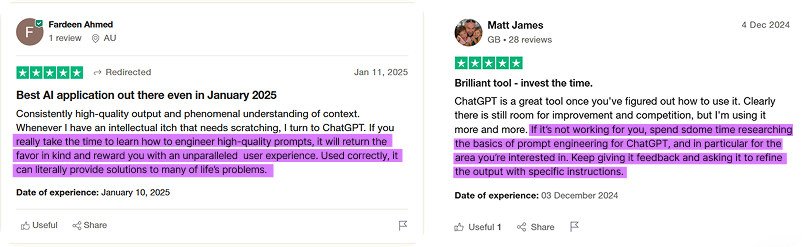
Some performance issues could have been resolved with better prompts
I was able to infer that the quality of responses would have been different if users had provided additional context or used structured commands with specific keywords for their requests.

Users who know how to prompt are quite satisfied with ChatGPT performance
A Critical Issue For Reliability Was Hallucination, Where ChatGPT Provides False Information As If It Were True

Discover
Competitor Analysis
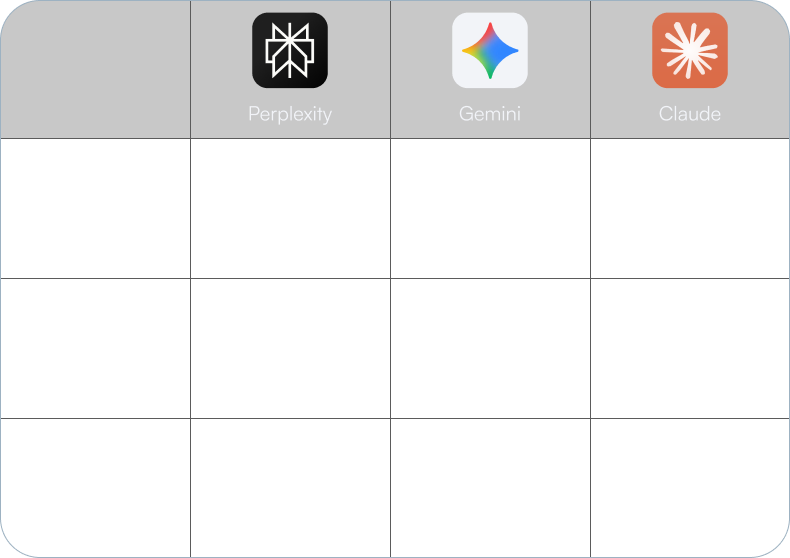
How competitors address those pain points
We looked at how three major AI competitors address these user pain points. While not perfect, each service already has small features or tools in place to tackle these issues.
Research / Discover
User Interview
Some users manually source and apply prompt templates from external platforms
Through in-depth interviews with five active ChatGPT users, I used open-ended questions to uncover their real-world struggles.
Every participant reported investing significant effort into crafting the right prompts to get better answers. Some of them were even sourcing proven templates from external platforms and adapting them for each specific task.
Every participant reported investing significant effort into crafting the right prompts to get better answers. Some of them were even sourcing proven templates from external platforms and adapting them for each specific task.
Users have to re-explain the same context for every new chat
Because users usually do not categorize their chats by topic, they end up providing the same background information every time they start a new session. Even within a single chat, ChatGPT often forgets initial instructions or provided information as the conversation gets longer.

User Interview Q&A Record
Users Manually Organized Chats to Avoid Repeating the Same Explanations in New Chats
Since auto-generated titles were often wrong or outdated, finding old chats was quite difficult. Some users spent time renaming their chats to keep things organized. Others just started new chats and explained everything again, which was too much of a hassle.
Users Double-Checked Suspicious Answers to Verify the Facts
Since ChatGPT often gives fake information confidently instead of saying "I don't know," users had to check the facts themselves. For important or latest information, they spent extra time searching the web or books to make sure the answers were correct.
Defining to Ideate
Problem Definition
& Strategic Hypotheses
& Strategic Hypotheses
01
If we use AI to automatically optimize prompts, user fatigue in writing prompts will disappear.
01
Problem: Lack of guidance for better prompting causes user fatigue during the writing process.
02
If we allow users to set instructions during onboarding, they won't need to repeat requirements during the conversation.
If users can select and save specific parts of a conversation, they can maintain context without repeating themselves.
01
Problem: Because ChatGPT often forgets context, users must repeat information or instructions they already provided.
Ideate
Solution Ideation
How might we make high-quality prompting as fast and easy as possible?
How might we reach the desired answer with minimum back-and-forth?
I began by brainstorming various ideas to answer the 'How Might We' questions, then categorised them into solution groups with specific features.
Affinity Mapping

Ideate
Solution Definition
Immediate solutions: one-click AI prompt optimiser
High-efficiency: simplified instruction settings & selective memory storage
To select the final solutions, I first prioritised ideas that offered high impact with low technical effort. I then conducted a second screening to focus on 'urgent' solutions that would provide immediate relief to the users' core pain points.
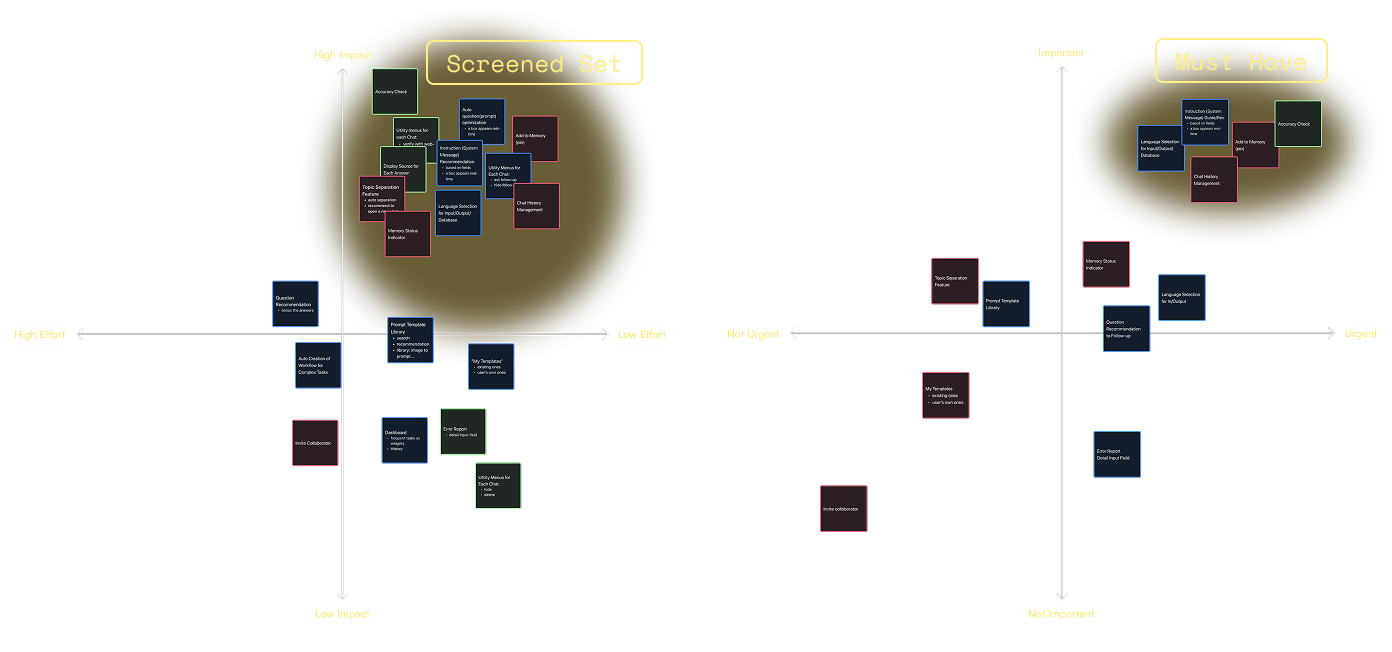
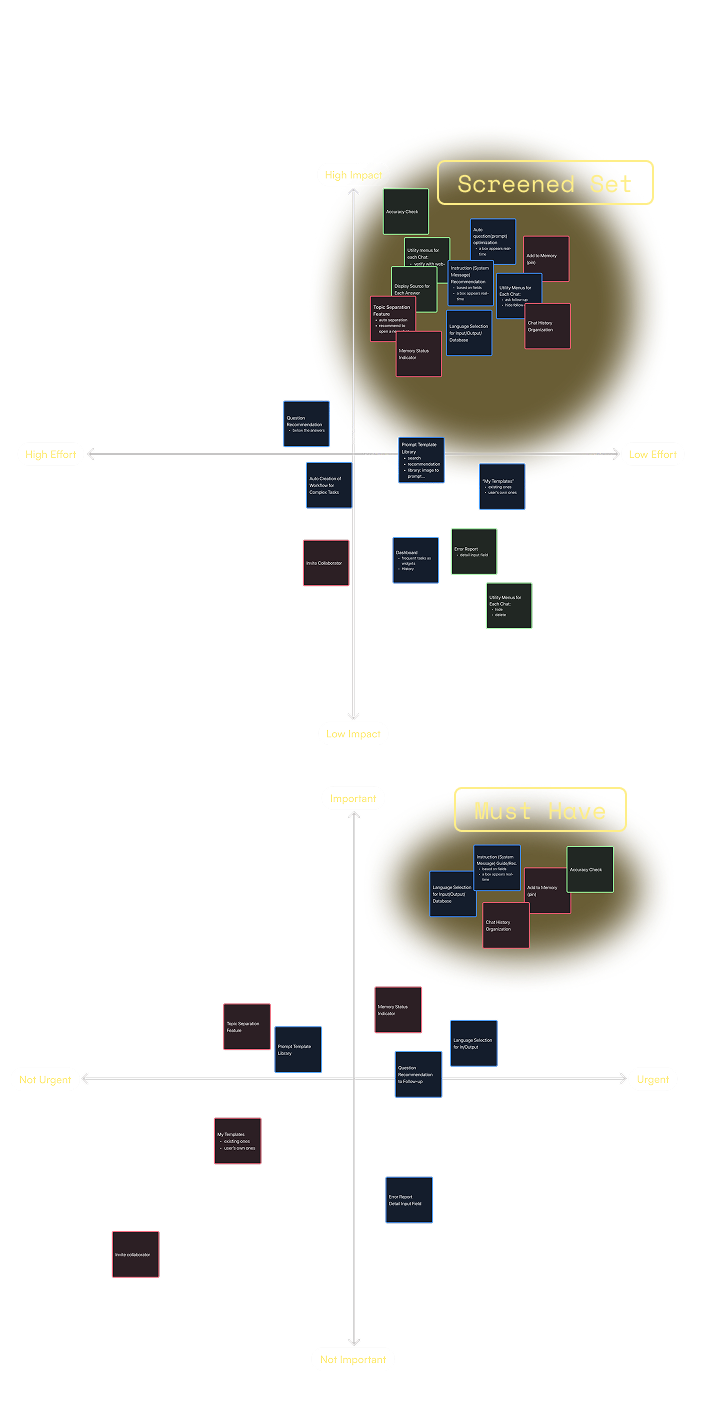
Prioritization Matrices

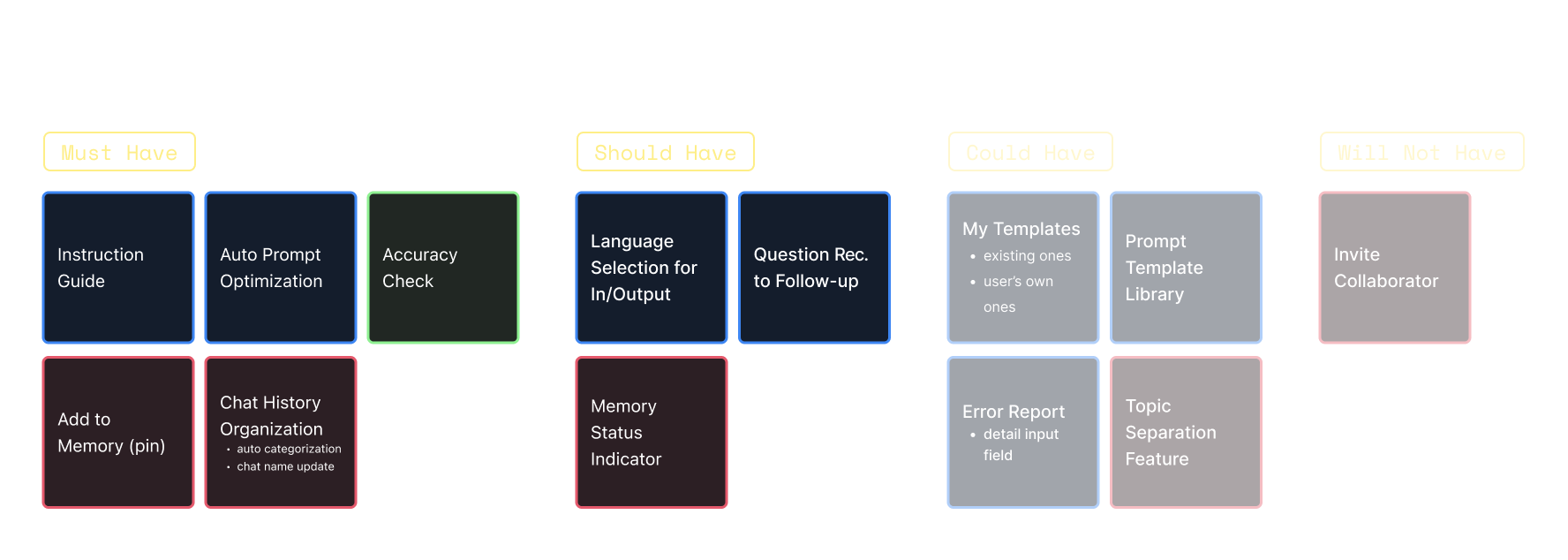
Prioritized Features
Prototype
From Sketch
to Prototype
to Prototype
Quick buttons for core features & simple setup flow anyone can use
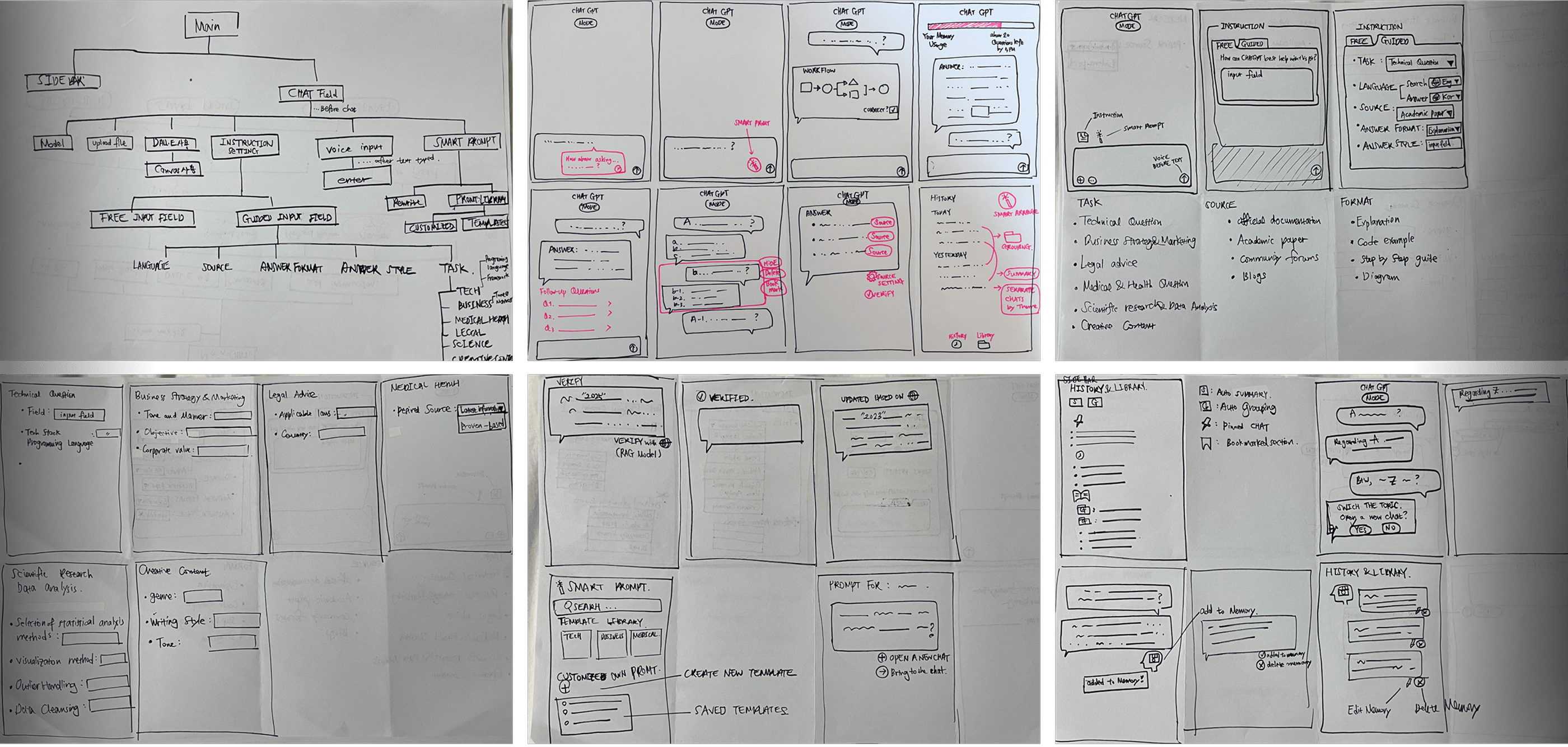
IA & Wireframes Sketches
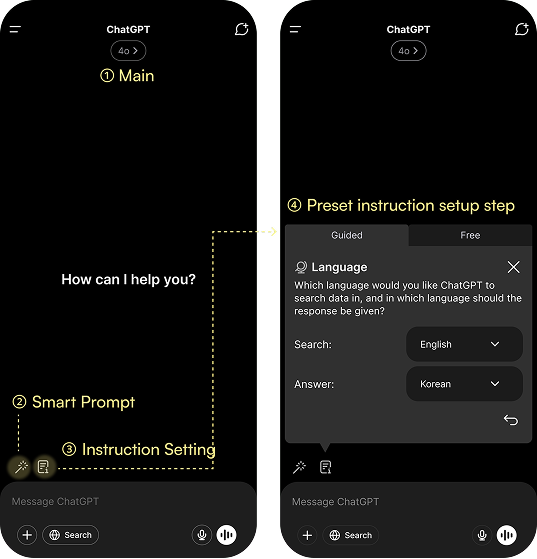
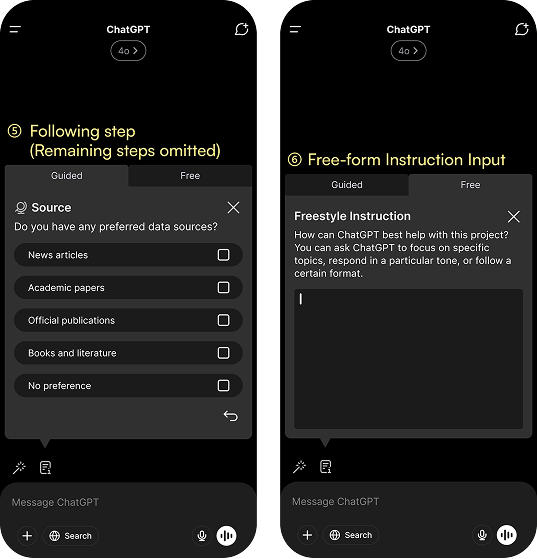
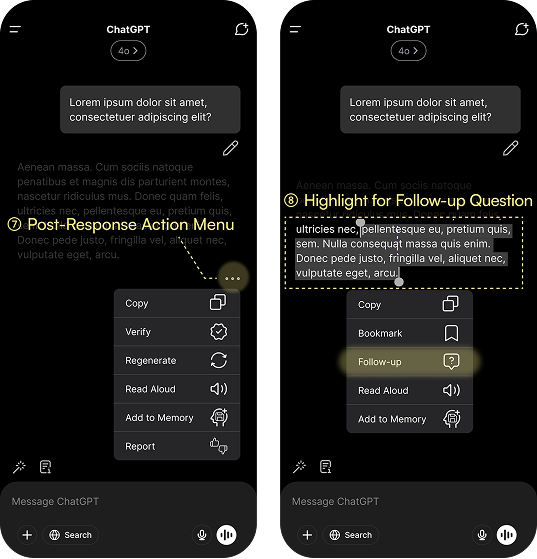
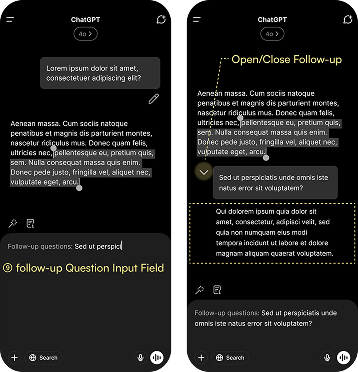
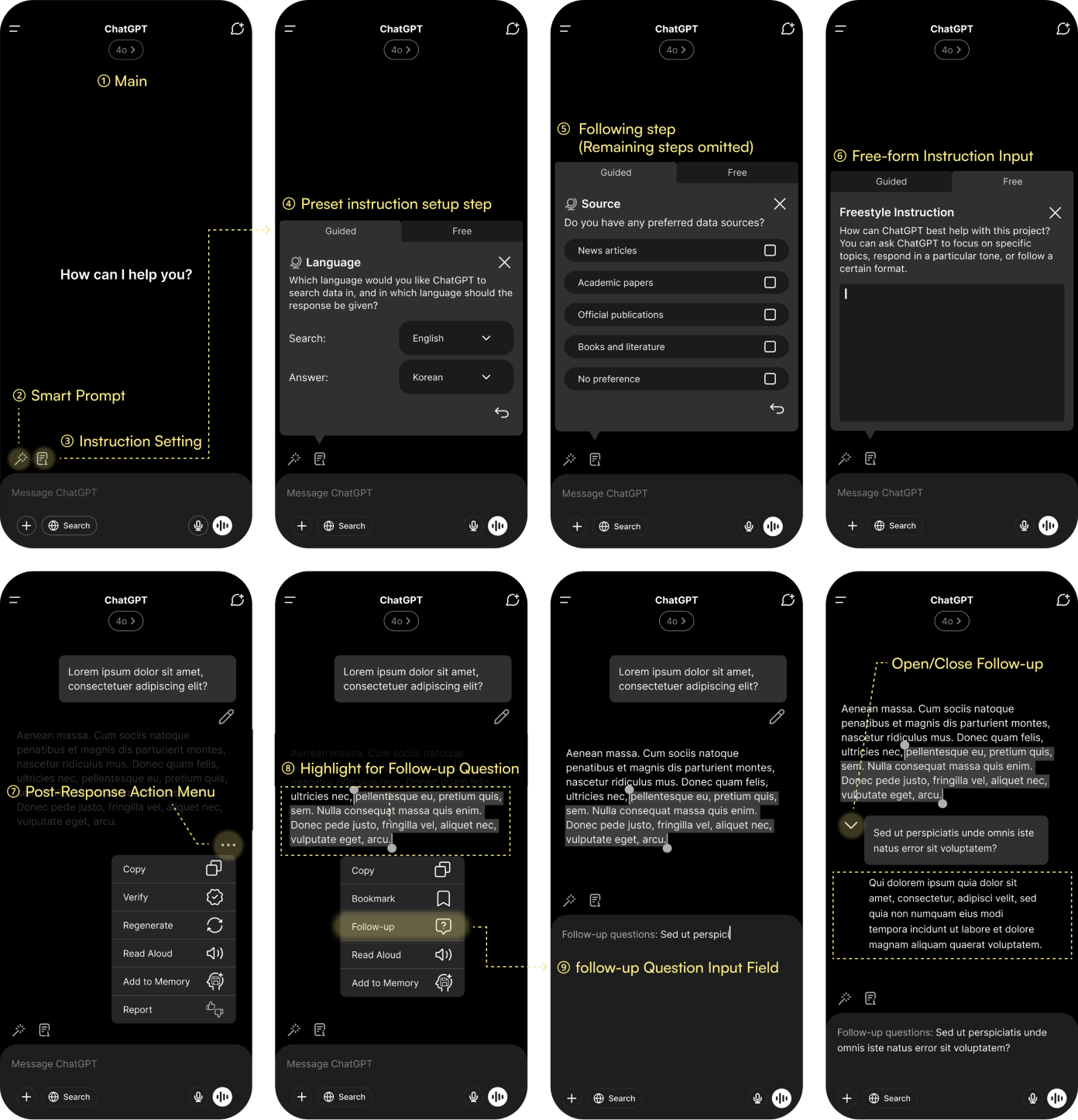
Design system: balancing familiarity and scalability
To maintain familiarity, I used ChatGPT’s existing UI style while building a modular system for new features. This ensures the interface remains consistent and scalable even as complex tools like 'Prompt Guidance' are added.

Prototyping: a real-life scenario from setting up instructions to organizing chat history
I developed an interactive prototype to test the full journey, from the first Instruction setup to real-time assistance during a chat.
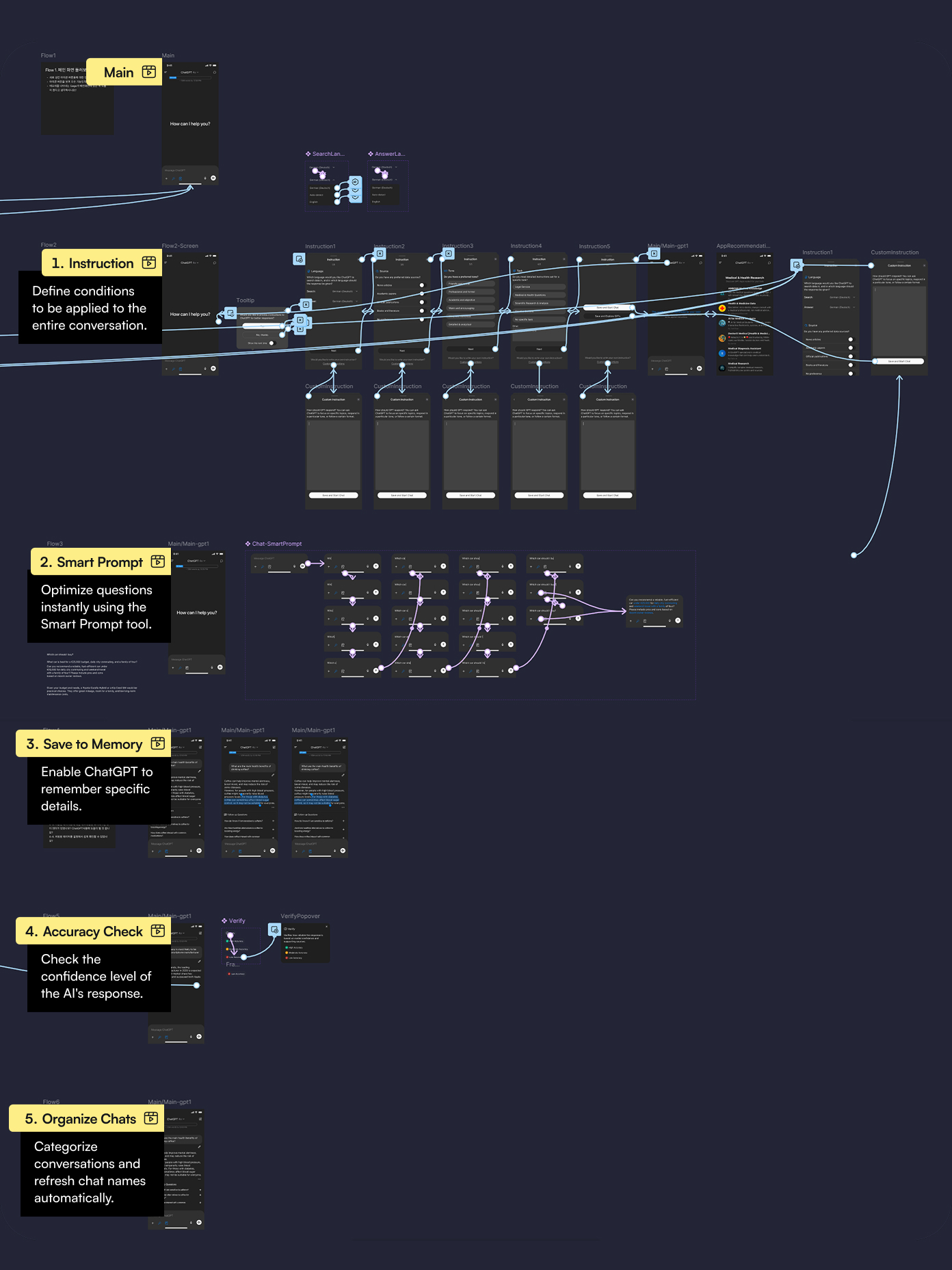
Prototype with Interactions
Prototype
Solution 04
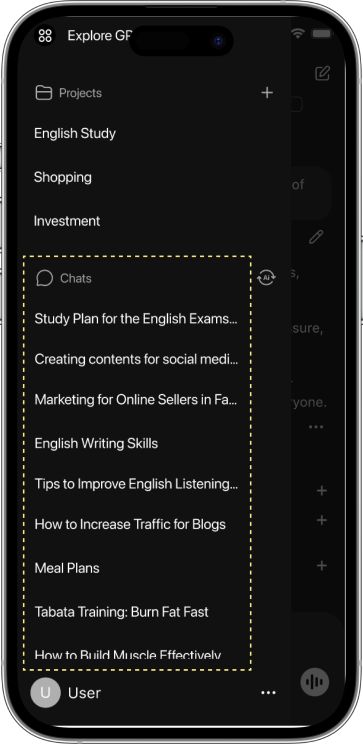
AI-powered Auto Chat Organizer
Chats often got messy, making past topics hard to find. Now, AI automatically organizes conversations, updates titles, and helps you locate chats instantly.
As-is
Chats pile up in time order and auto-titles lose relevance when topics change. When the app opens it always starts on a new chat, so users naturally create multiple scattered chats for the same subject.
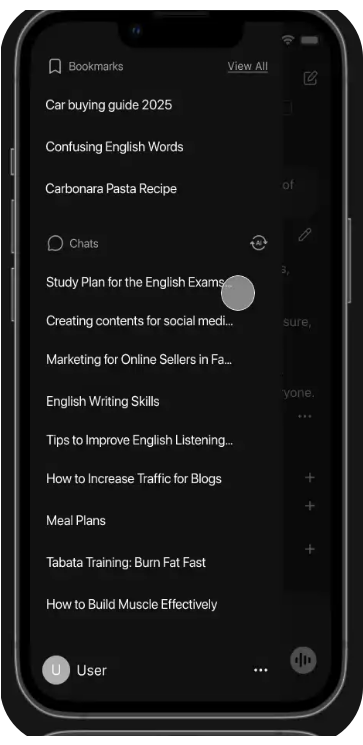
Renaming Chats
Chat titles are automatically updated to match the evolving topic.

Grouping
Relevant Chats
Chats on the same subject are organized together for easy access.
To-be
Chats are auto-organized by topic with clear titles. The chat name is automatically renamed as the conversation evolves, so it always matches the current subject. Past discussions are easy to find, and users no longer end up with multiple scattered chats on the same topic.
Prototype
Solution 05
Check the Accuracy Before Trusting the Answers
Frequent AI hallucinations led users to doubt the answers. The verification feature helps confirm accuracy and rebuild trust.
As-is
AI sometimes responds with confidence even when the answer is wrong. This creates confusion and reduces user trust.
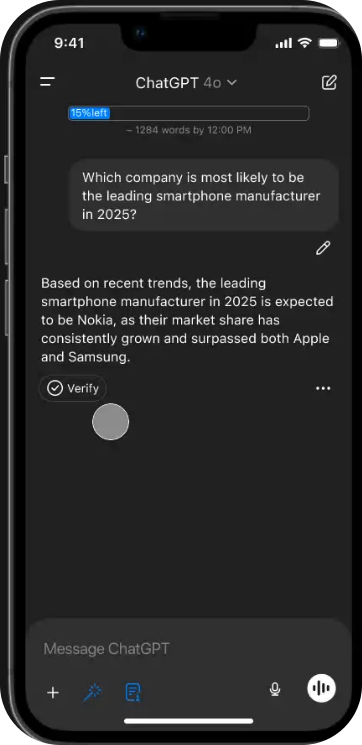

On-Demand Verification
Click Verify only when needed to instantly check the accuracy of a specific answer.

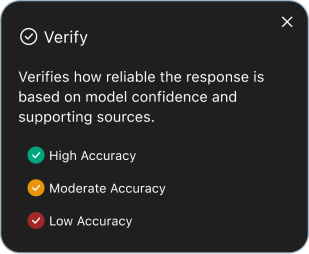
Intuitive Accuracy Level
To-be
Answers are verified with AI techniques likeSemantic Entropy Probes (SEP), which rephrase questions and check consistency. This reduces hallucinations and gives users confidence that responses are accurate and reliable.
Prototype
Feasibility Study
Are These Features Technically Possible?
I researched whether the planned features, Smart Prompt and Accuracy Check, can be implemented with today’s technology, since some functions require AI capabilities that go beyond a designer’s imagination alone.
Smart Prompt:
Advanced Prompt Optimization (Prompot Engineering)
Studied Prompt Engineering—techniques to reword and expand a question before sending it. Research shows prompt quality greatly impacts the relevance and accuracy of AI answers, making refinement a key step for better results.
Accuracy Check:
Answer Reliability Algorithm (Semantic Entropy Probes)
Explored Semantic Entropy Probes (SEP)—a method that rephrases a question in different ways and checks if answers stay consistent, to measure reliability and reduce hallucinations. SEPs are a promising method to detect hallucinations, with potential for real-world use.

Paper Research
Open

Test
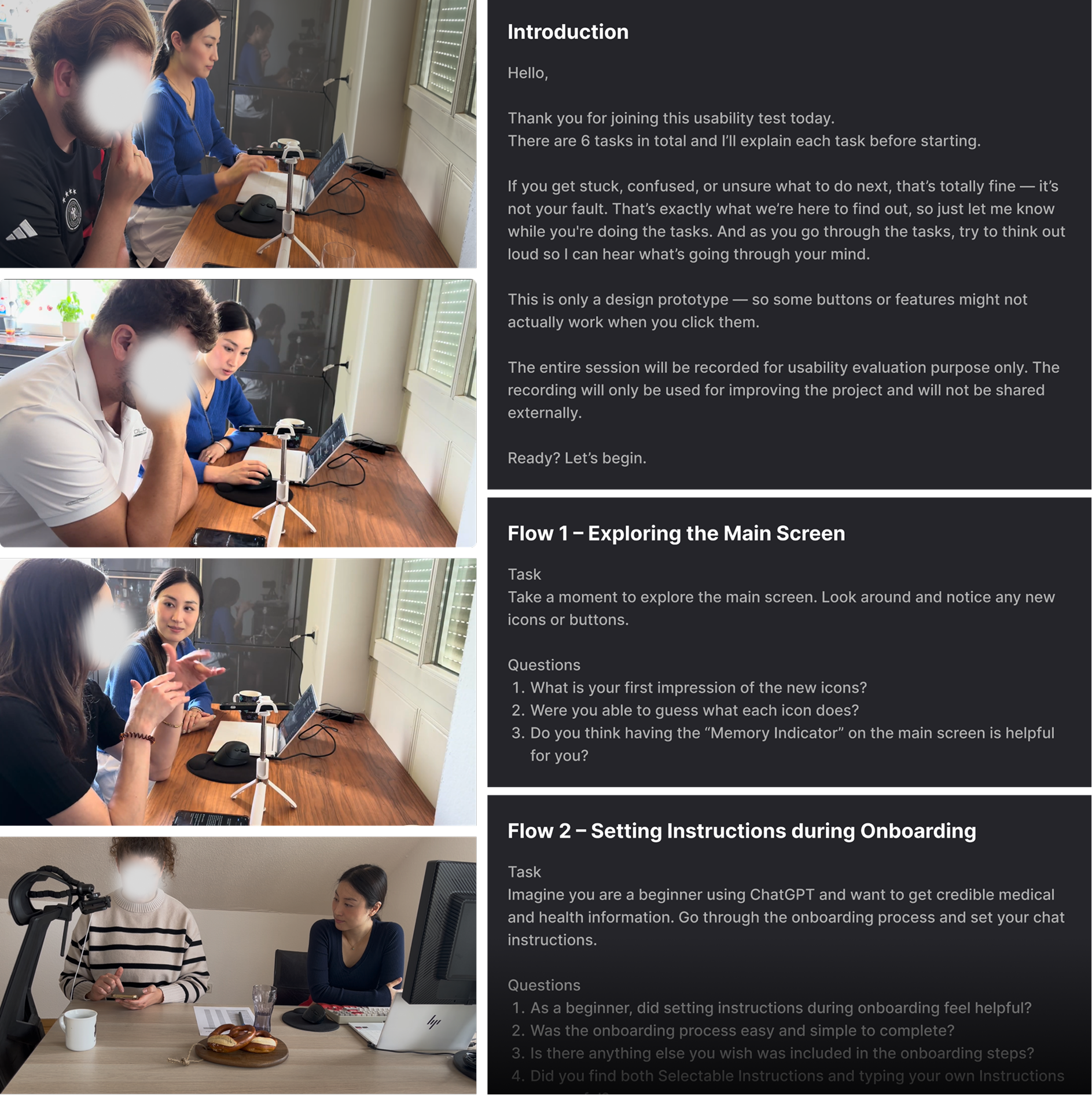
Usability Test
Users felt the Auto-Prompt Optimizer was immediately useful and served as a learning tool to understand how to write better prompts over time.
However, Instruction Setting was perceived as useful mainly for long-term projects (work or study). Users questioned its placement in the main input area since it is not a frequently changed feature.
Who I Tested
4 users in their late 20s to early 30s
Graduate students, professionals, and small business owners
Already familiar with ChatGPT (Free & Plus)
What I Wanted to Validate
Can users naturally discover and understand new features?
Where do they hesitate or get confused?
Do they find the features useful and relevant to their needs?
When would they actually use them?
How I Tested
Structured questions to ensure consistency across participants, as their ChatGPT proficiency varied significantly
Designed realistic scenarios reflecting everyday ChatGPT use
Used sample prompts rephrased from real ChatGPT outputs
Wrote natural chat examples to keep context authentic
Encouraged participants to imagine based on their past experience
Combined open-ended interviews with recorded screen interactions
Chat Usage Gauge on the Main
I added a gauge showing how much chat capacity was left on an account, thinking it would reassure users. In testing, most people either overlooked it or didn’t care. Even after I explained it, Plus users had never reached a limit, and free users didn’t chat enough to worry. What felt important to me ended up irrelevant in their real use.
Based on this, I planned to move the gauge into account settings, where it could live as a quiet reference instead of a main feature.
Test
Takeaways from Usability Testing
Finding flaws in a good app
ChatGPT was already a well-designed app, so I questioned whether I was magnifying small inconveniences just to find flaws. I realized that “discovering what others rarely notice” doesn’t always mean insight—it can simply mean most users were not really bothered.
Revealing hidden pain points
Even though ChatGPT was already good enough, I noticed that just because users can’t explain a problem clearly doesn’t mean it doesn’t exist. For me, the real value was in defining those unspoken pains.
For example, many thought the issue was ChatGPT’s AI engine and performance, and they barely mentioned prompt quality. I began to think that by adding ways to support better prompts, some of the dissatisfaction with performance could be eased without changing the model itself, since better prompts often led to noticeably better answers.
What I sketched became a real update!
ChatGPT’s updates moved quickly. I had designed a feature that let users highlight part of an answer and ask a follow-up question, but just before user testing ChatGPT released the same feature.
Since testers had already seen it in the real product, I decided not to include it in the prototype. The official version looked even better than mine, but I still felt proud that the area I chose to redesign was later added to the product itself.

Test
Limitations & Suggestions
Looking forward to AI collaboration
Since I do not have an AI engineering background, it was difficult to draw clear conclusions about what features were technically feasible, even after conducting desk research.
Especially, I kept questioning how much freedom users should be allowed when writing prompts. Because of the very nature of NLP (Natural Language Processing) products, their value lies in being able to interpret free-form human input. Yet in order to improve the quality of responses, it may also be necessary to guide or restrict the way users enter prompts.
Balancing these two aspects was not easy, and I wanted to check my ideas directly with AI engineers. In the future, I hope to join an AI product project to better understand what is realistically possible and where design can create value.
I’m happy to chat!


Designed by Dohee Han © 2025 All Rights Reserved.
Copied!